

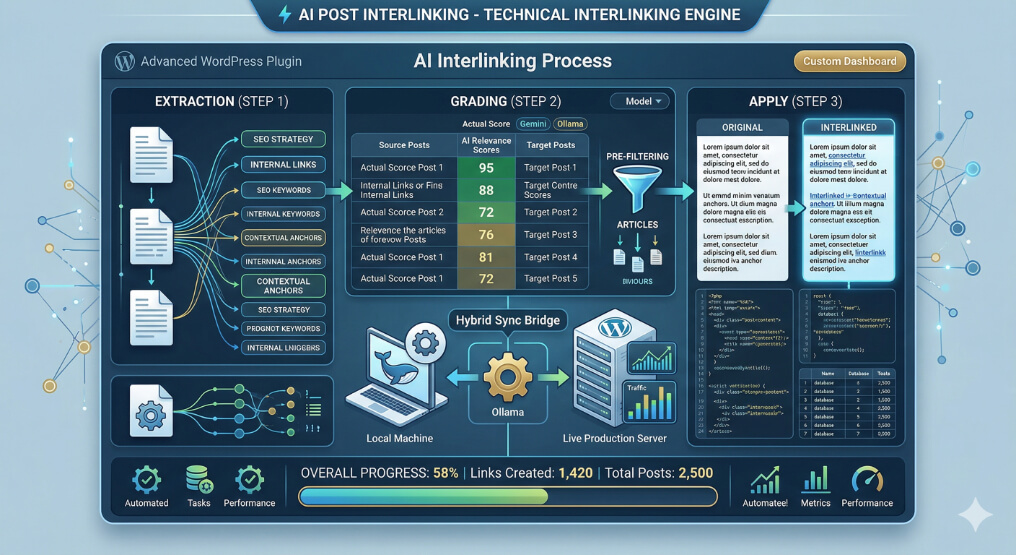
1. Plugin Overview
AI Post Interlinking is an advanced, AI-powered internal linking engine for WordPress. Designed to vastly improve on-page SEO automatically, it scans an entire site’s content, extracts meaningful anchor text candidates, and autonomously connects conceptually related posts.
Key Value Proposition
Manual internal linking is one of the most tedious and time-consuming tasks in SEO. Traditional auto-linking plugins rely on simple, exact-match keyword mapping, often resulting in repetitive, unnatural links. This plugin completely modernizes the process by leveraging Large Language Models (LLMs) to understand contextual relevance, grading potential links in real-time, and perfectly matching source anchors to destination content—all completely hands-free for the site administrator.
Core Capabilities
- True AI Comprehension: Utilizes either Google Gemini (Cloud) or Ollama (Local) to semantically comprehend article topics, extracting intelligent phrase-based anchor texts exactly as they naturally appear in the copy.
- V3 Processing Engine: Employs an ultra-granular, micro-step background processing architecture. It can safely analyze and interlink thousands of posts without causing server timeouts or exhausting PHP memory limits.
- Hybrid Live-Site Interlinking: A standout feature allowing users to run the heavy AI workloads (via local Ollama) on a local/staging environment, while seamlessly fetching unlinked posts and pushing the finalized, interlinked HTML structure back to their highly-trafficked live production server via secure REST API sync.
- Smart Pre-filtering Architecture: Integrates WordPress’ native search capabilities as a preliminary filter before passing data to the LLM, reducing expensive and slow API calls by up to 90%.
Target Audience
This plugin is the ultimate SEO tool for high-volume content publishers, affiliate marketers, and agency developers looking for an enterprise-grade automated linking solution that guarantees programmatic safety and high semantic accuracy.
2. Architecture & Technology Stack
AI Post Interlinking is engineered using a robust, decoupled object-oriented architecture built for extreme scalability, ensuring it operates smoothly whether dealing with 100 or 100,000 posts.
Core Components
The plugin revolves around specialized processing classes:
AI Interlinker_Interlinking_Engine_V3:- The heart of the plugin. It breaks the monumental task of cross-referencing an entire database into atomic “micro-steps” (Extract, Grade, Apply).
- Operations are stateful; every micro-step writes its progress to custom database tables (
ai-interlinker_interlinking_processing,ai-interlinker_interlinking_target_progress). This allows the process to be paused, interrupted, or survive a timeout, automatically resuming exactly where it left off.
- The AI Wrappers (
AI Interlinker_Interlinking_Gemini_API&AI Interlinker_Interlinking_Ollama_API):- Unified interfaces handling external HTTP communication.
- The Gemini API translates payload requests for Google’s cloud LLMs, managing token limitations (dynamically chunking content).
- The Ollama API natively connects to a local
localhost:11434instance, bypassing token boundaries and allowing completely free, private, offline AI grading.
AI Interlinker_Interlinking_REST_API&AI Interlinker_Live_Site_Interlinking_API:- Establish the “Bridge” architecture. The REST class registers custom endpoints (
/wp-json/ai-interlinker-interlinking/v1/*) on the live server. - The API Client class initiates secure, authenticated cross-origin requests from a local server to pull content, evaluate it using the local GPU (via Ollama), and POST the finalized HTML back to the live server.
- Establish the “Bridge” architecture. The REST class registers custom endpoints (
AI Interlinker_Interlinking_Admin:- Manages the sophisticated, asynchronous AJAX interface. It loops batch requests from the browser to the backend (
ajax_process_batch), driving the V3 engine forward and updating real-time UI progress bars without blocking the main PHP thread.
- Manages the sophisticated, asynchronous AJAX interface. It loops batch requests from the browser to the backend (
Technology Stack & Schema
- Backend Logic: PHP 7.4+ object-oriented framework.
- Frontend UI: Vanilla JS, jQuery for asynchronous event loop generation (
setIntervalpolling loops for background tasks). - APIs: Google Gemini REST API, Local Ollama API, Custom WordPress REST API Endpoints.
- Database: Introduces 5 heavily-indexed custom MySQL tables (e.g.,
wp_ai-interlinker_interlinking_grades,wp_ai-interlinker_interlinking_links) purposefully isolated from corewp_postmetato prevent database bloat and ensure sub-millisecond query performance when identifying the highest-scoring keyword-to-post matches.
3. Core Features Deep Dive
This document details the precise logic underlying the AI Post Interlinking plugin’s primary functions.
3.1. The Three-Step Micro-Engine (V3)
The decision to break interlinking into three stateful micro-steps is what allows the plugin to function on restricted shared hosting servers.
- Step 1 (Extraction): The AI reads the source article and extracts 10 to 15 key contextual phrases exactly as they appear in the raw text (preserving punctuation/casing).
- Step 2 (Grading): For every phrase extracted, the engine pits it against the Title and Meta Description of potential target articles. The LLM acts as an SEO judge, returning a JSON array assigning a relevance score from
0to100for every Keyword-to-Target combination. - Step 3 (Application): A MySQL query selects the highest-scoring paths (
ORDER BY relevance_score DESC LIMIT X). The engine parses the DOM, hunts for the exact string phrase, and wraps it in a perfectly crafted<a>tag, ensuring no duplicated targets.
3.2. WP Search Pre-Filtering (The Optimizer)
Sending hundreds of thousands of combinations to an LLM is computationally unfeasible. The plugin employs a brilliant filtering mechanic:
- Before the LLM is asked to grade anything, the extracted keywords are silently passed through the native WordPress
WP_Querysearch engine. - WordPress returns the “Top N” (default: 10) most relevant articles based on its internal full-text indexing.
- The AI grading (Step 2) is then restricted exclusively to these Pre-Filtered targets, reducing API strain, tokens, and time complexities by 80-90%.
3.3. Remote/Live Site Syncing
Running heavy AI operations (like Ollama) directly on a production server can crash the site or slow down page loads for users.
- The Live Sync Feature solves this by separating the processing environment from the production environment.
- The administrator installs the plugin on their local computer (running XAMPP/LocalWP + Ollama) and on their live site.
- The local installation connects to the live via an encrypted API Key.
- It pulls Live Site Category trees, downloads pending Live Site articles, processes the entire AI interlinking matrix locally on the user’s hardware, and securely patches the injected HTML anchor tags back into the Live Site’s database.
3.4. Dynamic Keyword Filtering
If the AI extracts a keyword that performs poorly (e.g., scoring a 0 across 80% of targeted posts or averaging an overall score below 5.0), the system dynamically flags it. The keyword is purged from the active queue to prevent wasting computational electricity and API tokens on low-value anchor texts.
4. Installation & Configuration Guide
Setting up AI Post Interlinking requires configuring either an external Cloud LLM (Google Gemini) or an internal Local LLM (Ollama).
System Requirements
- WordPress 5.0 or higher
- PHP 7.4 or higher
- Google Gemini API Key OR Local Ollama (
llama3+) installation - MySQL 5.6 or higher (Plugin creates 5 custom tables upon activation)
4.1. Installation
- Upload the
ai-post-interlinkingdirectory to your/wp-content/plugins/folder via FTP or the WordPress Plugin uploader. - Navigate to your WordPress Admin dashboard > Plugins.
- Locate AI Post Interlinking by AI and click Activate.
4.2. Configuring the AI Engine (Local Site)
- Navigate to Post Interlinking by AI in the WordPress admin menu.
- Under the AI Provider dropdown, select your preferred engine.
- Google Gemini: You must generate a free API Key from Google AI Studio and paste it here. Note that Google imposes strict token rate limits on free tiers.
- Ollama (Recommended for Heavy Workloads): Requires Ollama installed on the server or the user’s local machine. Ensure the endpoint is set correctly (default:
http://localhost:11434/api/generate) and the model is defined (e.g.,llama3.2).
4.3. Configuring the Live Site Sync (Optional)
If you wish to run the heavy AI workloads locally while pushing changes to a production site:
- Install and activate the plugin on both your Local/Staging environment and your Live Production server.
- On your Live Site, navigate to Live Site Interlinking. The plugin will generate a secure REST API Key. Copy this key.
- On your Local Site, navigate to Live Site Interlinking.
- Enter your Live Site’s full URL (e.g.,
https://my-blog.com) and paste the API Key. - Click Test API Connection. The two environments are now securely bridged.
4.4. Tuning Processing Settings
Before triggering a site-wide interlink process, configure the following:
- Max Links per Post: Determine the upper limit of automatic links the AI should insert per article (Range: 1-20, Recommended:
5-10). - Pre-Filtering: Enable WordPress search-based pre-filtering to drop processing times by 90%. Set the Top N threshold (Recommended:
10). - AI Grading Batch Size: Adjusts how many external posts the LLM grades concurrently. Smaller batches are safer for restricted servers; Larger batches are faster.
5. Usage Guide
AI Post Interlinking provides an intuitive, non-technical dashboard to commence massive, automated SEO operations.
5.1. Running Local Interlinking
To cross-reference and link posts residing strictly on your current WordPress database:
- In your WordPress Admin panel, click on the Post Interlinking by AI main menu item.
- Ensure you have properly configured your AI Provider.
- Select a specific Category from the dropdown menu, or choose All Categories to analyze your entire database.
- (Optional) Check Skip Already Interlinked Posts to ensure the AI does not waste tokens on articles it has already optimized.
- Click Start All Post Interlinking.
- A responsive dashboard will appear, visually detailing exactly what the AI is currently doing (Step 1: Extracting phrases, Step 2: Grading combinations, Step 3: Applying optimized HTML).
Note: You may safely navigate away from this page. The AJAX event loop will suspend, but the database saves the exact index and process state. Upon returning to the page, the interlinking engine will seamlessly resume exactly where it was interrupted.
5.2. Running Live Site Interlinking (The Bridge)
To utilize your local machine’s processing power (via Ollama) to optimize your production website:
- Ensure the Live Sync Configuration bridge is established.
- In your Local WordPress Admin panel, click on the Live Site Interlinking submenu item.
- Click the Refresh button next to the Post Category dropdown. This will fire a REST GET request to the live server, populating your local interface with the live site’s category taxonomy.
- Select the category you wish to optimize.
- Click Start All Post Interlinking.
- The dashboard will look identical to the local process, except beneath the hood, the plugin is fetching the raw data from your live website, computing the relevance matrices locally to avoid burdening your production server, and pushing the finalized posts back live via
wp_update_post.
5.3. Maintenance & Restitution
- At the bottom of both dashboards, you will find a “Reset & Clean All Links” button.
- Should you ever wish to reverse the AI’s operations, clicking this will autonomously parse your database, locate every anchor tag originally generated by the plugin, strip the HTML to return the string to plain text, and wipe the associated SQL tracking tables.