
1. Plugin Overview
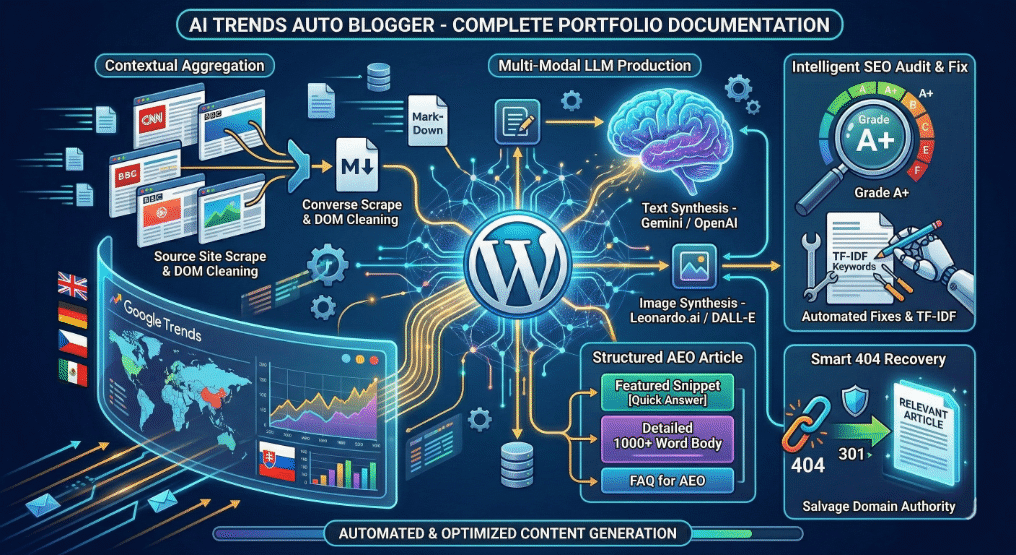
AI Trends Auto Blogger is an enterprise-grade automated content generation engine for WordPress. It leverages real-time data from Google Trends to detect emerging topics, source relevant news articles, and autonomously write highly optimized, 1000+ word blog posts using Large Language Models (LLMs).
Key Value Proposition
Maintaining a high-traffic news or niche blog requires constant vigilance to catch trending topics before competitors do. This plugin acts as an autonomous newsroom. It continuously monitors Google Trends by country, reads the source materials covering the trend, and instructs AI to synthesize a completely original, SEO-optimized article. This is not simply spinning text; it is intelligent content aggregation and creation designed to win Google’s Featured Snippets and Answer Engine rankings.
Core Capabilities
- Google Trends Integration: Reads live RSS feeds to identify current search trends, ensuring the blog publishes culturally and temporally relevant content.
- Answer Engine Optimization (AEO): Articles are generated with a strict structure, including “Quick Answers” at the top for Featured Snippets, and a detailed FAQ section at the bottom for Voice Search optimization.
- Built-in SEO Audit Tool: Features a proprietary bulk-scanning engine that grades every post on the site (A+ to F), checking title lengths, keyword density, and heading structures, with auto-fix capabilities.
- Smart 404 Redirects: Instead of losing traffic to broken links, the system automatically parses the dead URL string for keywords and 301-redirects the user to the most semantically similar article.
- Multi-Modal AI Architecture: Supports OpenAI and Google Gemini for text generation, alongside Leonardo.ai and DALL-E for automated featured image synthesis.
Target Audience
Designed for programmatic SEO specialists, affiliate marketers, and automated news aggregators who need to scale their content production infinitely while maintaining strict adherence to Google’s Helpful Content guidelines.
2. Architecture & Technology Stack
AI Trends Auto Blogger utilizes a modular, object-oriented architecture built to handle intensive cron jobs, dynamic API fetching, and heavy DOM manipulation without stalling the WordPress instance.
Core Components
The plugin architecture is split into distinct operational modules:
- The Aggregation Engine (
core-init.php):- Fetches the Google Trends RSS payload.
- Extracts the source URLs accompanying the trend.
- Utilizes
wp_remote_getto literally visit the third-party source articles. - Employs a hyper-aggressive
DOMDocumentcleaning function (aibd_tab_removeUnnescessaryTagsFromHTMLcontent) to strip out navbars, footers, scripts, and CSS, isolating only the pure journalistic text.
- The Prompt Compiler:
- Converts the stripped DOM HTML into clean Markdown.
- Injects the Markdown into a massive systematic prompt instructing the AI (OpenAI or Gemini) exactly how to format the output HTML structure (demanding H2s, H3s, bullet points, and 1000+ words).
- The Diagnostics Engine (
SEO-AUDIT-TOOL):- A React-style, AJAX-driven interface built over native WP tables.
- It runs batch processes (20 posts at a time via
aibd_tab_run_seo_audit) across the entire WP database, executing regex patterns to measure title lengths, meta descriptions, and keyword density, storing the transient scores in the database to prevent memory crashes.
- Maintenance Daemons (
db-optimization.php):- Hooks into
wp_cronto perform headless database optimization, clearing out old logs, orphaned data, and optimizing table fragmentation on a weekly schedule.
- Hooks into
Technology Stack & Schema
- Backend Logic: PHP 7.4+, heavily utilizing
DOMDocumentandDOMXPathfor internal scraping and DOM parsing. - APIs Integrated: Google Trends RSS, OpenAI (GPT-4), Google Gemini (Cloud LLM), Leonardo.ai (Image Generation), Twitter/X (Social Posting).
- Database: Creates independent MySQL tables (e.g.,
wp_ai_trends_posts_logs) to log the original HTML, the prompt sent, and the timestamp of every automated action for debugging and transparency.
3. Core Features Deep Dive
This document details the distinct sub-systems that power the AI Trends Auto Blogger plugin.
3.1. Automated Content Generation Engine
When a trend triggers, the system doesn’t just ask the AI to write blindly. It:
- Identifies the specific phrase trending in a targeted country.
- Visits the top 3 news websites currently ranking for that trend.
- Scrapes their raw HTML, cleans it, and transforms it into Markdown.
- Feeds all 3 competitor articles into the LLM context window.
- Forces the LLM to output a
jsonor rawhtmlblob containing a click-optimized title, a targeted meta description, a Quick Answer section, a comprehensive body, and an FAQ block.
3.2. Integrated SEO Audit & Auto-Fix Tool
Far surpassing standard SEO plugins, this system can analyze hundreds of posts simultaneously using Batch Processing to prevent server timeouts.
- Grading Matrix: Assigns each post a letter grade (A+ to F) and a 0-100 numerical score based on a strict SEO rubric.
- TF-IDF Keyword Extraction: If an article lacks meta keywords, the tool uses the Term Frequency-Inverse Document Frequency algorithm to determine the article’s most important words mathematically and automatically updates the database.
- Generative Fixes: If a meta description or image
altThe text is missing. Clicking the “Fix” button will trigger the AI to read the article specifically to write and inject the missing SEO metadata.
3.3. Dynamic Visual Generation
An article is incomplete without visuals. The plugin features four distinct imagery engines:
- Leonardo.ai: Uses advanced stable-diffusion models to generate cinematic headers.
- OpenAI DALL-E: Prompts DALL-E to draw an abstract representation of the article’s core theme.
- Source Articles: Attempts to extract and legally attribute the leading image from the competitor posts.
- Random Local: Pulls an optimized, pre-existing asset from the WordPress Media Library to save API costs.
3.4. Smart 404 Recovery Router
A seamless script that listens for WP 404 errors. When triggered, it explodes the requested URL slug into keywords, initiates a WP_Query search on the database for those keywords, and instantly issues a 301 Moved Permanently header to redirect the user to the closest matching active article, salvaging domain authority and reducing bounce rates.
4. Installation & Configuration Guide
Setting up the AI Trends Auto Blogger involves activating the plugin and inserting the proper API credentials for your chosen third-party AI services.
System Requirements
- WordPress 5.7+
- PHP 7.4+ (Requires
DOMDocumentandcURLenabled) - Active API Key for OpenAI or Google Gemini
- Active API Key for Leonardo.ai (if employing custom AI imagery)
4.1. Installation
- Upload the
aibd-trends-auto-bloggingdirectory to your WordPress site under/wp-content/plugins/. - Navigate to your WordPress Dashboard > Plugins.
- Find AI Trends Auto Blogging and click Activate.
- The system automatically provisions the
wp_ai_trends_posts_logstable upon activation.
4.2. API Configuration
- Navigate to AI Trends Settings in the WordPress admin menu bar.
- Select your AI generation engine from the Article Provider dropdown (Default:
OpenAI). - Paste your generated API key into the corresponding field.
- If image synthesis is desired, populate the
Leonardo AI KeyorDALL-E Keyfields.
4.3. SEO Metadata Settings
The plugin will try to guess your overarching genre based on the country you select.
- Scroll down to the SEO & AEO Settings.
- Determine if the plugin should automatically write
[Focus Keyword]values upon post generation. - Configure the specific formatting parameters for the Smart 404 System (should it attempt a 301 redirect or block the entire 404 page?).
4.4. Scheduling Operations
The aggregation engine runs silently via wp_cron.
- Select the frequency at which the RSS pipeline pings Google Trends (hourly, daily, etc.).
- Determine the Database Optimization thresholds—how many days should old logs and deleted prompt data be kept before being permanently wiped? Default is typically 90 days to prevent bloat.
5. Usage Guide
AI Trends Auto Blogger requires minimal manual intervention after installation, but the dashboard features a comprehensive array of tools to ensure content accuracy and optimal SEO performance.
5.1. Automated Content Pipeline
Once your selected Country/Location has been set inside the Settings, the cron scheduler takes over.
- It connects to
https://trends.google.com/trending/rss?geo=[COUNTRY_CODE]. - It lists the top queries.
- It visits the URLs linked in those queries, cleans the DOM, extracts the body text, and initiates an LLM prompt.
- The post is generated directly as a “Draft” or “Published” article inside your default WordPress interface.
- To monitor this, visit the Auto Posting Logs tab. You’ll see a complete audit table of the Source URL, the ChatGPT Generation output, the resulting post ID, and the timestamp.
5.2. Running the SEO Audit Tool
Even manual authors benefit massively from the inclusive diagnostic suite.
- Go to AI Trends -> SEO Audit.
- Click Run SEO Audit. The screen utilizes jQuery to iterate over large databases, 20 items at a time, without exceeding memory limits.
- Analyze the output table. You will see colored badges (Red = Critical, Yellow = Error, Blue = Fixable minor issue) and a letter grade (A+ through F).
- For posts scoring a
Cor less, simply click the “Fix” button next to it. - In real-time, the interface background processes the post, instructs the TF-IDF engine to construct missing Keywords or Meta Descriptions based on the copy, saves it to Yoast/Internal fields, and instantly upgrades the post’s grade to an
Ain the UI list.
5.3. Forcing a Manual Update
If news breaks instantly, developers do not need to wait for the WP Cron pipeline.
- Go to AI Trends Settings.
- Click the debugging button to trigger a manual check of the RSS feed and force the process instantly.